rustworkx.generators.lollipop_graph
- lollipop_graph(num_mesh_nodes=None, num_path_nodes=None, mesh_weights=None, path_weights=None, multigraph=True)
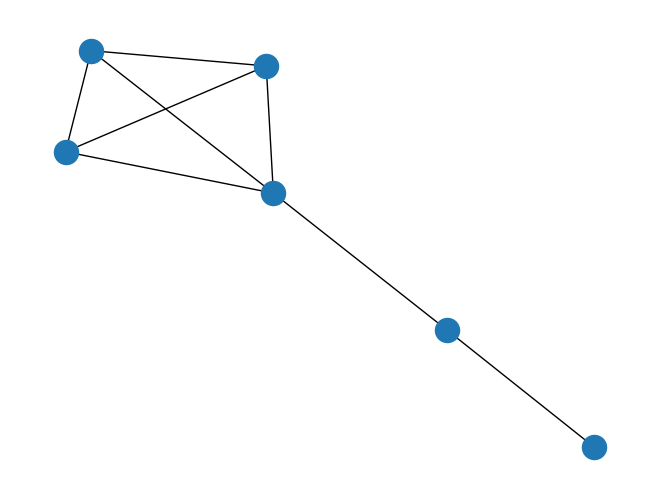
Generate an undirected lollipop graph where a mesh (complete) graph is connected to a path.
If neither
num_path_nodesnorpath_weights(both described below) are specified, then this is equivalent tocomplete_graph()- Parameters:
num_mesh_nodes (int) – The number of nodes to generate the mesh graph with. Node weights will be None if this is specified. If both
num_mesh_nodesandmesh_weightsare set, this will be ignored andmesh_weightswill be used.num_path_nodes (int) – The number of nodes to generate the path with. Node weights will be None if this is specified. If both
num_path_nodesandpath_weightsare set, this will be ignored andpath_weightswill be used.mesh_weights (Sequence[Any]) – A sequence of node weights for the mesh graph, typically a list. If both
num_mesh_nodesandmesh_weightsare set,num_mesh_nodeswill be ignored andmesh_weightswill be used.path_weights (Sequence[Any]) – A sequence of node weights for the path, typically a list. If both
num_path_nodesandpath_weightsare set,num_path_nodeswill be ignored andpath_weightswill be used.multigraph (bool) – When set to
Falsethe outputPyGraphobject will not be not be a multigraph and won’t allow parallel edges to be added. Instead calls which would create a parallel edge will update the existing edge.
- Returns:
The generated lollipop graph
- Return type:
- Raises:
IndexError – If neither
num_mesh_nodesormesh_weightsare specified
import rustworkx.generators
from rustworkx.visualization import mpl_draw

graph = rustworkx.generators.lollipop_graph(4, 2)
mpl_draw(graph)